Nothing exposes fragile data architecture quite like an automated pipeline running under the personal identity of an engineer who resigned three weeks ago.
It happens every single quarter.
IT deactivates an employee’s enterprise directory account on a Friday afternoon. By Saturday morning, the primary revenue ingestion pipeline fails with a 403 PERMISSION_DENIED error. By Monday morning, executive dashboards are blank because twenty critical Databricks workflows were set to run_as an individual user.
Having evaluated data platforms across enterprise environments for 26 years, I can tell you this truth:
Pipeline failures after team turnover are not bad luck. They are structural identity debt.
Data teams do not start with headless CI/CD, isolated workspaces, and declarative infrastructure as code. They progress through distinct operational stages. Recognizing where your platform sits today allows you to transition to the next phase without breaking production or stalling feature delivery.
Here is the three-phase data team maturity model, the operational traps of each stage, and the tactical migration playbook to de-risk your platform.
Phase 1: The ClickOps Honeymoon
In early-stage deployments, the Databricks browser UI offers unmatched time-to-insight. An engineer can spin up compute, ingest data with Lakeflow, test PySpark transformations (all in interactive notebooks, btw), and schedule a recurring workflow in an afternoon.
I see this all the time, in fact I have a client now that has a team of engineers that were still in this mode. They develop using the UI in a dev workspace and then manually recreate jobs and pipelines in a Prod workspace. And, they are using the creator as the ‘run_as’ person, so when someone leaves it is always a fire drill to get everything changed.
The failure occurs when organizations treat rapid prototyping as a permanent operating model.
The Technical Debt of Phase 1
Identity Debt: Automated workflows execute under personal user accounts (
chris.gambill@gambilldata.com). Personal access tokens (PATs) expire, user privileges shift, and employee departures break production.Direct-in-Prod Execution: Development happens inside the same workspace and storage accounts that serve production reporting. A developer running an unconstrained query or an ad-hoc
MERGEon an interactive cluster risks table locks, schema corruption, and runaway DBU consumption.Fragmented Business Logic: Code is scattered across personal workspace folders in unversioned notebooks with arbitrary names.
Phase 1 is an acceptable starting point. It becomes an active business liability the moment you hire your second data engineer or support an audit-governed workload under SOC 2 or SOX compliance.
Phase 2: The Hybrid Trap (The Git Folders Illusion)
When Phase 1 breaks down, management mandates change control: adopt version control and stop developing directly in production.
The team links Git Folders to their repository provider. Engineers commit notebook revisions to branches and merge via pull requests. Leadership assumes the deployment problem is resolved.
That same team I just mentioned, this was their next step (because this is a linear journey, not a big bang fix). The first step was using Git and cutting branches to do the dev work and merging to main for production. But, that just covers their notebooks (primarily) and some python scripts.
In reality, linking Git to a browser UI just creates version-controlled ClickOps. The team hits four immediate bottlenecks:
Testing Friction: Validating transformations requires attaching notebooks to running interactive clusters. Testing code incurs compute charges, takes minutes to spin up, and lacks automated unit test assertions.
Manual Promotion Panic: Moving code between development and production requires an engineer to log into the production workspace, pull the latest branch in a shared Git folder, and manually create jobs and pipelines then schedule them and set up alerts.
Environment Drift: Development runs on modern DBR runtimes with ad-hoc compute policies, while production runs on an unpinned single-node cluster configured two years ago that nobody understands.
Schema Drift: Unity Catalog schema changes are executed via manual SQL scripts run in interactive query windows, creating inconsistencies between environments.
Velocity stalls in Phase 2 because deployment friction increases while production workloads remain vulnerable to manual configuration errors. This is part of the growing pains that orgs go through as their team matures.
Phase 3: Headless Lakehouse as Code (The Enterprise Standard)
In Phase 3, the browser UI is an observability console, no longer an authoring or deployment tool. Production becomes entirely headless.
The Enterprise Architecture Standard
Local Development: Engineers develop locally in VS Code, Codex, Claude Code or Cursor using the Databricks extensions/connectors. Code quality is enforced before commit using linters (Ruff), type validation (Pydantic), and local test suites (
pytest).Declarative Automation Bundles (DABs): Workflows, pipelines, compute definitions, and permissions are declared as version-controlled code in
YAML.
(Are those cheers from the stands for version control of your Jobs and Pipelines?)
Modular Packaging: Core business logic is packaged into tested wheels rather than thousand-line monolithic notebooks. Notebooks serve solely as thin execution wrappers.
Automated CI/CD via Service Principals: GitHub Actions or ADO pipelines validate, build, and deploy bundles. Jobs execute strictly under non-human Service Principals configured with least-privilege Unity Catalog grants.
Physical Environment Isolation: Dev, Staging, and Prod run in dedicated Databricks workspaces tied to separate storage containers.
Fortune 500 platforms and mature data teams operate here. When an engineer leaves the company, zero scheduled production workloads fail.
The Migration Playbook: De-Risking the Transition
Moving from Phase 1 to Phase 3 cannot involve freezing feature delivery for six months to rewrite infrastructure. The transition must happen incrementally.
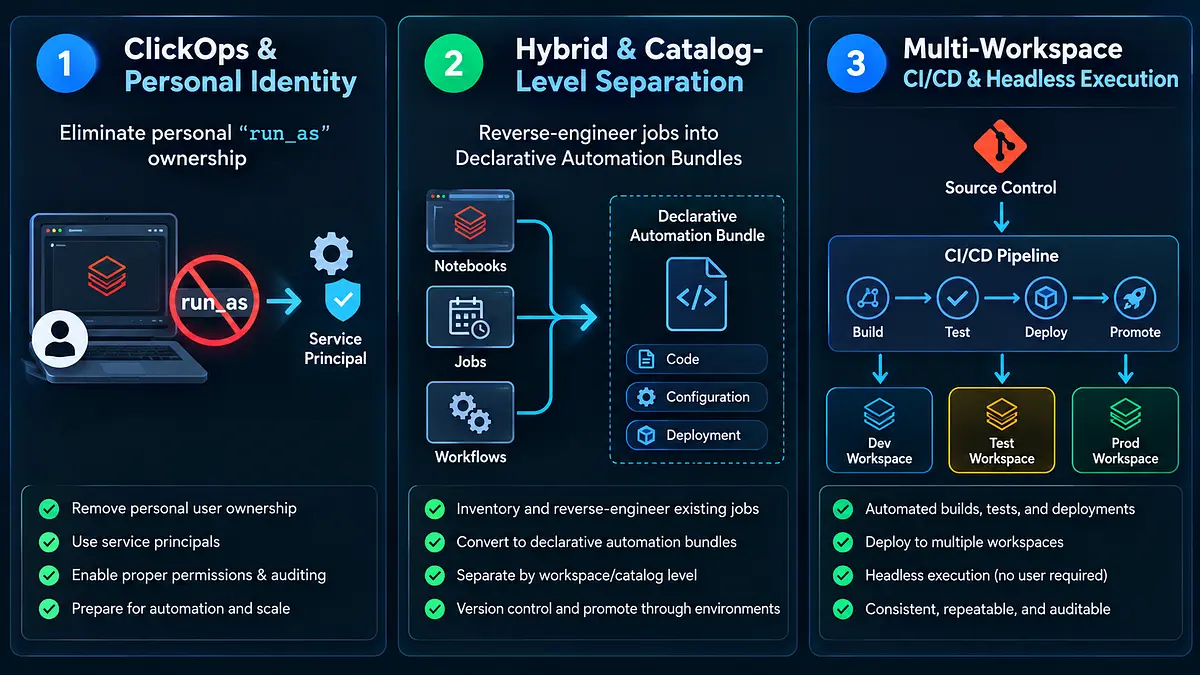
1. Eliminate Personal “Run As” Ownership Immediately
Do not wait for full CI/CD adoption to fix identity debt:
Create a dedicated Service Principal in Microsoft Entra ID, AWS IAM, or the Databricks Account Console.
Use OpenID Connect (OIDC) Workload Identity Federation rather than static client secrets or personal access tokens. This allows deployment pipelines in GitHub Actions or Azure DevOps to authenticate ephemerally without storing long-lived credentials.
Assign the Service Principal minimum required permissions on target Unity Catalog schemas and storage credentials.
Reassign existing workflow ownership. Every automated job in Databricks Workflows must run under a Service Principal identity.
2. Reverse-Engineer Existing Jobs into Code
Do not build complex bundle configurations from scratch. Using Databricks CLI (version 0.218.0 or later) export existing workspace jobs directly into Declarative Automation Bundles:
# Verify CLI version (requires >= 0.218.0)
databricks version

# Reverse-engineer an existing production job into a deployable bundle
databricks bundle generate --job-id 8472910482910 --output-dir ./pipeline-bundle
This command inspects the target workspace job and outputs a clean, deployable databricks.yml definition containing the task graph, cluster specifications, and parameters. Update the bundle configuration to enforce Service Principal execution:
bundle:
  name: customer-churn-pipeline

targets:
  prod:
    mode: production
    workspace:
      host: https://adb-123456789.azuredatabricks.net
    run_as:
      service_principal_name: "00000000-0000-0000-0000-000000000000"
Deploy and validate the bundle to your target workspace:
databricks bundle deploy -t prod3. Decouple Business Logic from Notebooks
Extract transformation logic from monolithic notebooks into pure Python modules:
Organize business functions in
.pyfiles inside a standard Python package structure.Run unit tests against transformation logic locally with
pytestwithout provisioning cloud compute.Reference the module from your Databricks workflows using wheel tasks or lightweight orchestration notebooks.
4. Structure Environments Proportionately
For Mid-Market Teams (Phase 2 Bridge): If multi-workspace infrastructure is constrained by budget or licensing, isolate environments within a single workspace at the Unity Catalog level:
lakehouse_dev: Open read/write permissions for engineers.lakehouse_staging: Automated testing schema for deployment validation.lakehouse_prod: Read-only for humans; write access restricted strictly to CI/CD Service Principals.
For Enterprise Teams (Phase 3 Standard): Provision dedicated Databricks workspaces for Dev, Staging, and Prod linked to isolated cloud accounts to prevent cross-environment compute contention and blast radiuses.
The 26-Year Perspective
Twenty-six years ago, data teams scheduled SQL Server DTS and SSIS packages on servers running under domain credentials tied to individual engineers. When an engineer left, SQL Server Agent failed, and reports broke.
A decade later, early big data teams executed unversioned MapReduce jobs from terminal sessions logged in as personal administrative users.
The compute engines have changed from on-premise hardware to cloud lakehouses and autonomous AI agents. The underlying operational reality has not:
Convenience in development creates failure in production when systems are not built for governance.
UI workflows are excellent for validation and rapid prototyping. Production systems require automated deployments, non-human execution identities, and deterministic environments.
The Five-Point Platform Audit
Evaluate your data platform against these operational criteria:
The Turnover Test: If your lead engineer resigned today, would any scheduled production pipeline fail due to credential deactivation within 48 hours?
The Deployment Test: Does promoting code from development to production require manual copying, pasting, or UI parameter adjustments?
The Compute Isolation Test: Do production scheduled workloads share interactive clusters with ad-hoc user queries?
The Disaster Recovery Test: Can you recover from bad logic pushes cleanly? (For batch tables: roll back via
RESTORE TABLE ... TO VERSION AS OF. For streaming pipelines and Lakeflow: do you have a documented protocol to re-point or replay checkpoint directories without corrupting downstream state?)The Production Access Test: Do human engineers possess direct write access to production catalogs, or are production modifications restricted strictly to automated CI/CD Service Principals?
If you scored poorly on three or more, do not attempt to refactor every pipeline at once. Pick one critical workflow, extract it into a bundle using the Databricks CLI, assign it to a Service Principal, and build the foundation you can defend six months from now.
Chris Gambill
Founder, Gambill Data, LLC
Related decision support
Databricks lakehouse risk review
Get an independent view of job ownership, identity debt, environment structure, and deployment practice before turnover breaks production.
Review the service