Last week, during the East Tennessee Databricks User Group I co-organize, we did a live build.
From a blank slate, we developed and deployed an app called Pawsonality in 11 minutes flat.
The concept was simple: you describe your personality, your living situation, and your work habits. An internal LLM processes your text and recommends the ideal dog or cat breed for your lifestyle, right down to custom name suggestions.
I fed it a prompt describing myself. I’m a data consultant, career coach, and Marvel nerd who works from home and enjoys weekend hikes.
Eleven minutes later, the app was live. It recommended an Australian Shepherd (95% match) to keep pace on mountain trails, and a Maine Coon (88% match) because it wouldn’t disrupt client consulting calls. It even generated Marvel-themed names for both: Jarvis, Rocket, Loki, Thor, Banner, and Groot.
It was silly. It was fun. And developer velocity felt like magic.
No container configuration files. No IAM role wrestling. No infrastructure provisioning. Just code, click, and deploy.
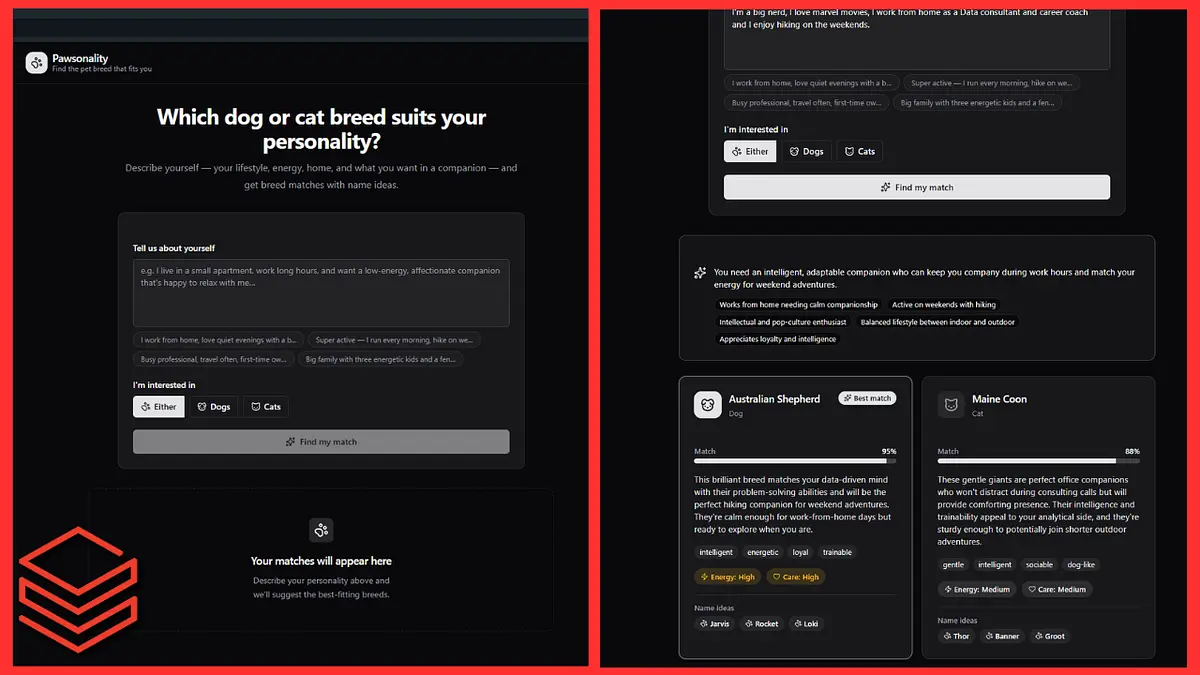
Caption: The 11-minute demo high. “Pawsonality” built and deployed live using an internal LLM with zero external network dependencies.
By Sunday evening, I was still riding that high. I decided to take two of my actual production Databricks Apps and migrate them to Serverless Micro Apps and App Spaces to see how they handled real enterprise workloads.
One of them hit a concrete wall immediately.
The other delivered a massive FinOps win.
Both taught me lessons about platform maturity, software architecture, and the hidden danger of adopting preview features before you understand their operational boundaries.
App 1: The Zero-Egress Brick Wall
The first candidate was my Data Portfolio Project Creator.
The application does two things:
It takes live URLs from job postings, scrapes the requirements, and extracts the technical data stack the employer is hiring for.
It calls an LLM to search for matching open-source datasets on the web so an engineer can build a targeted, real-world portfolio project.
In standard Databricks Apps, this runs cleanly.
In App Spaces, it stopped cold.
App Spaces currently enforces zero external network egress. None. Not for Python libraries, not for third-party REST APIs, not for external databases, and not for LLM web-searches. The micro app can talk to internal workspace resources like Lakebase and Unity Catalog, but it can’t touch the outside internet.
If your application depends on pulling live data from the web, calling Stripe, pinging Slack webhooks, or syncing with Salesforce, App Spaces is currently a non-starter.
My initial reaction was frustration. I closed the tab and thought, Well, this feature isn’t ready for real work. To be fair it is in beta after all.
I was wrong. My architecture was the problem.
The Architectural Blind Spot
I posted my findings on Reddit, and an engineer in the comments asked a simple, piercing question:
Why are you running failure-prone, external web scraping inside stateless application compute in the first place?
They were right. I had been blinded by the fact that the code didn’t work as originally designed.
Running live web scraping inside the request-response cycle of an interactive web app is fragile. It introduces latency, unhandled timeouts, and network failure modes directly into the UI layer.
The constraint of the beta actually exposed a better design pattern… Decoupling.
Instead of forcing the App Space to do the scraping, the app should simply capture the URL, trigger an asynchronous Databricks pipeline or workflow with proper network access, let the platform ingest the data, and write the parsed results into a database where the app can read it.
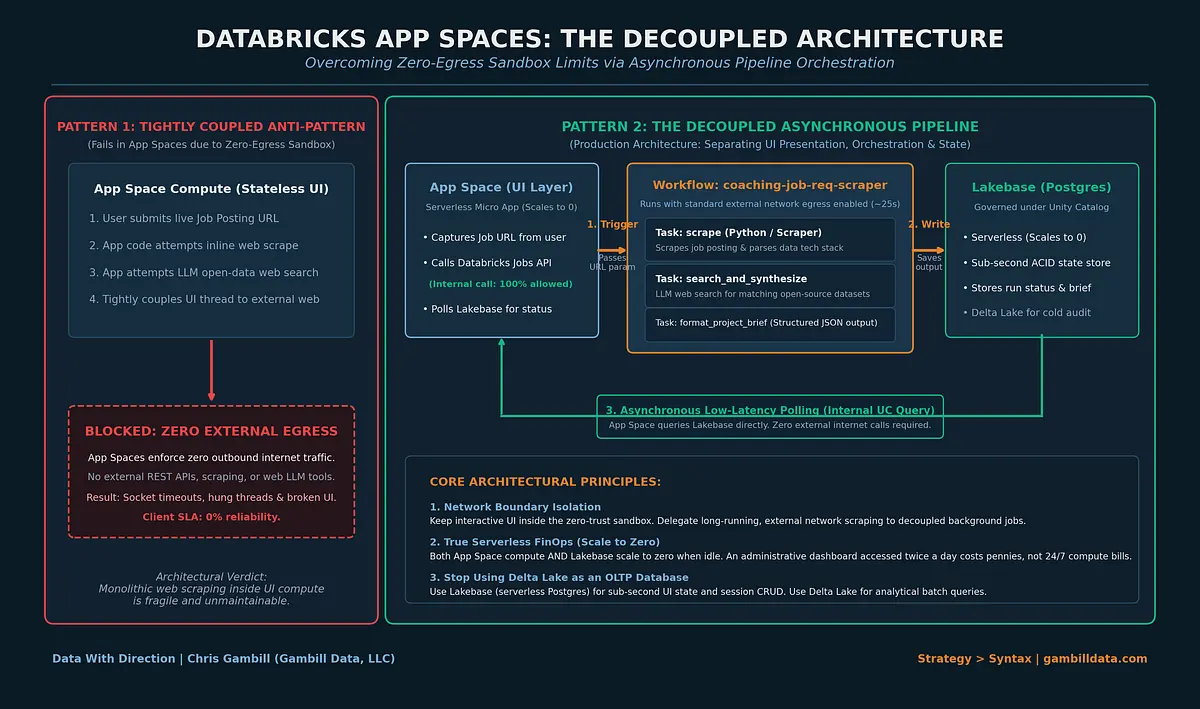
Constraints force cleaner architecture. But only if you step back from the keyboard and rethink the system instead of complaining about the sandbox. I got caught up with the forest, as the saying goes, and couldn’t see the trees.
App 2: The FinOps Win (DBU Observability at Scale-to-Zero)
My second test was an internal client-facing FinOps application.
This app monitors DBU consumption across workspaces, tracks compute anomalies, and writes operational metrics directly to Lakebase.
Because it only touches internal workspace telemetry and requires zero external internet calls, the migration worked on the first try.
This is where Serverless Micro Apps shine:
The Idle Compute Problem Disappears: Traditional Databricks Apps run on provisioned compute. If your internal team checks an administrative dashboard twice a day, you still pay for that compute cluster to sit idle 24 hours a day, 7 days a week. With Micro Apps, both the app compute and Lakebase scale to zero. A continuous monthly compute bill turns into pennies.
The Cold Start Reality: When the app is idle, waking it up takes roughly 30 seconds. In the current beta, you occasionally need a quick browser refresh once it finishes spinning up.
For high-throughput, customer-facing web products, a 30-second cold start is unacceptable.
For internal administrative tools, reporting dashboards, and weekly operational review screens, trading 30 seconds of patience for a 95% reduction in compute spend is a no-brainer.
The Golden Rule: Stop Using Delta Lake as an OLTP Database
Watching engineers build on Databricks Apps over the last few months has revealed an alarming anti-pattern.
People are treating Databricks Apps like interactive notebooks and dashboards.
They write application session state, user login preferences, button clicks, and rapid row-level CRUD transactions directly into analytical Delta tables.
Stop doing this.
Delta Lake is an analytical storage format built for high-throughput batch and streaming append/merge operations over Parquet files.
Delta Lake is not an OLTP database.
When you hit a Delta table with dozens of rapid, concurrent row updates from a web interface, you create massive metadata churn, file compaction debt, and write-conflict errors.
If your application needs to handle transactional state, use Lakebase. That latency you are seeing now, as you write to delta tables, it gets worse when you deploy and more people are using it and more data exists.
Lakebase is serverless Postgres embedded inside the Databricks ecosystem. It scales to zero, gives your micro apps the sub-millisecond ACID transactions that web engineering demands, and remains fully governed under Unity Catalog.
Keep your analytical queries in Delta Lake. Put your application state in Lakebase. Defend that boundary early, or your platform team will spend months untangling corrupted state tables.
Why You Test in Beta (And Why You Don’t Deploy)
A lot of data teams fall into one of two camps.
The first camp ignores vendor betas entirely. They wait until a tool has been generally available for two years before touching it. By then, their architecture is rigid, outdated, and playing catch-up.
The second camp practices Tool Cosplay. They see an 11-minute demo at a conference, rush back to the office, and push a mission-critical executive dashboard onto a preview release by Friday afternoon.
Both approaches are reckless.
You should test beta features aggressively. You test them so you understand the vendor roadmap before your competitors do. You test them so you can identify the security boundaries, the networking limitations, and the true cost profile.
You do not deploy beta features to production.
Here is why:
Zero SLA: If an App Space goes down during an executive review, Databricks Support is not obligated to wake up an engineer to fix it.
Breaking Changes: APIs, environment specifications, and configuration parameters in beta releases change without deprecation warnings.
Missing Enterprise Tooling: Right now, App Spaces lacks direct Git repo synchronization and mature CI/CD pipelines. If you can’t test, review, and deploy code through automated source control, it does not belong in your production environment.
Test in the sandbox to learn the physics of the tool. Keep your production workloads on battle-tested foundations.
The Weekly Mission: Auditing Your Preview Footprint
Before you let your team spin up the next exciting serverless feature, run this 4-step sanity check:
Map the Network Perimeter: Does the workload require third-party webhooks, external scraping, or public APIs? If yes, verify egress restrictions before writing code.
Separate State from Analytics: Inspect your team’s application pull requests. If anyone is writing session state or user CRUD into a Delta table, re-route those writes to Lakebase or an external Postgres instance.
Calculate Cold Start vs. Idle Cost: Audit your existing internal tools. If you have low-frequency apps running on dedicated clusters 24/7, flag them for a serverless migration the moment App Spaces hits general availability.
Enforce the 6-Month Test: Ask the hard question: If this API is deprecated or overhauled in six months, can we defend the time and money we spent building on it today?
Strategy over syntax. Every single time.
Chris Gambill
Founder & Principal Architect, Gambill Data, LLC
Make the data decision you can defend six months from now.