A regional analytics director in a regulated enterprise recently faced a familiar mandate.
Their legacy environment was being depreciated and everything had to move to Databricks within twelve months.
Sitting on a VM in the corner were roughly 500 automated reports running via Windows Task Scheduler.
Four analysts kept the lights on. Two knew basic SQL. None knew PySpark. The original authors of those programs had retired five years earlier.
(I know you already feel this viscerally, I’ve personally gone through this several times in my career)

Enter stage right, a big box systems integrator steps in with a proposal.
They pitch a team of external contractors and a seven-figure estimate to “lift and shift” the workload. Their strategy was straightforward: translate every legacy script line-by-line into Databricks notebooks.
That strategy is an architectural ambush.
Translating legacy scripts line-by-line into cloud notebooks does not modernize your platform. It automates fifteen years of accumulated technical debt, guarantees an immediate spike in your monthly DBU burn, and leaves your staff unable to support the system once the consultants leave.
I have been through versions of this migration several times in my 26 year career. The expensive mistake starts when the organization confuses code conversion with modernization.
Before asking how to rewrite 500 reports, ask which business capabilities those reports actually provide.
Where the 1:1 Rewrite Breaks Down
When teams treat migration as a translation exercise, they run directly into four structural failures.
1. Hidden inefficiency becomes visible spending
In an on-prem or flat-license environment, running an unoptimized script at 2:00 AM costs zero incremental dollars. The server hardware is already paid for. It is running when everyone is asleep and no one cares as long as it is ready at 8:00 AM when reports get refreshed.
The cloud does not work on sunk costs.
Every cluster start, every unpruned table scan, and every redundant notebook execution consumes DBUs (CUs if you are in Fabric) and cloud compute. When you lift and shift 250 unoptimized jobs into Databricks, your CFO will notice within forty-five days. You took free, 20 year old, local execution and converted it into metered recurring operational waste.
2. Report duplication becomes pipeline duplication
A stakeholder in the Northeast asks for a report. Six months later, someone in the Southeast wants the same information for their region. An analyst copies the original file, changes the WHERE clause, and schedules another job.
Repeat that pattern across departments, status codes, products, and fiscal periods. Suddenly your workspace now contains hundreds of reports, but far fewer distinct business concepts.
Translate every file independently and you risk creating separate pipelines and tables for logic that should be shared.
The correct unit of migration is the business capability. A legacy filename is only evidence of how someone implemented it.
3. Upstream promises become downstream rework
Enterprise data platform programs rarely land their tables on schedule.
Corporate IT promises that all core schemas will be live in Unity Catalog by Q1. In reality, ingestion pipelines slip, data contracts are undefined, and schema validation lags.
If you start rewriting downstream reports before the upstream Silver and Gold layers exist and are verified, your team builds logic on quicksand. You end up with temporary extracts, hardcoded staging paths, and assumptions about tables that have not arrived. And those “temp fixes” become permanent fixtures in your data architecture.
4. Tribal knowledge gets lost in translation
Legacy reports often contain rules documented nowhere else, created by someone who long since left. Things like compliance overrides, metric definitions, edge cases, and fiscal adjustments live in hardcoded scripts (or an old .xls file).
If external developers work in isolation, the internal analysts lose the opportunity to explain those rules and learn the replacement system.
Then, six months after delivery, an edge case fails. The consultants have moved on. The team responsible for daily operations cannot explain the new pipeline.
The migration is complete on the project plan. Operational ownership is still unresolved.
A Better Migration Playbook
Here is the defensible architecture playbook we use at Gambill Data to move a legacy reporting suite to Databricks without blowing your budget or breaking your team.
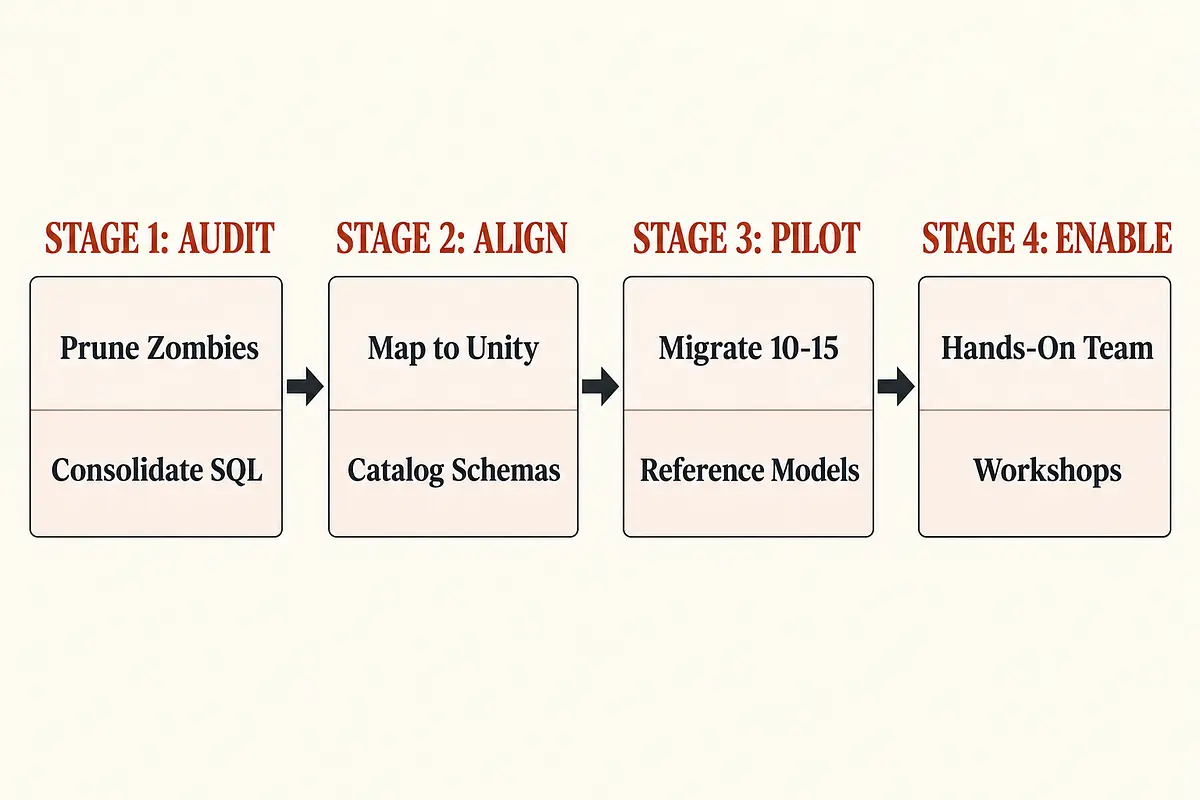
Stage 1: Audit the portfolio
Before anyone writes a single line of SQL or Python, conduct an aggressive portfolio audit.
Kill the Zombie Reports: Identify every report scheduled to run. Cross-reference the output against actual consumption over the last six months. If a report is delivered to an unmonitored inbox or a retired manager, decommission it immediately.
Consolidate Filter Variants: Group remaining reports by underlying data entity. If sixteen reports pull from the same operational dataset with different status codes, consolidate them into a single curated Gold table with dynamic filtering or an aggregated semantic model.
Eliminate Manual Extraction Workflows: Flag reports whose sole purpose is exporting data to CSV so someone can manually paste it into Excel. These workflows should be targeted for direct BI integration or scheduled automated delivery.
Cutting your report volume from 250 down to 75 cuts your migration timeline, your delivery risk, and your future DBU bills by more than half before you touch a keyboard.
Stage 2: Align with upstream readiness
Do not write code against schemas that do not exist in production.
Map your consolidated report list against the enterprise Unity Catalog deployment roadmap. Establish three strict migration queues:
Queue A (Ready Now): Upstream Bronze and Silver tables are deployed, documented, and actively refreshed in Unity Catalog.
Queue B (Blocked): Upstream sources are still in ingestion backlogs. Freeze development on these until corporate data lands and passes validation.
Queue C (Deprecation Candidates): Low-value ad-hoc requests that can be retired once legacy systems shut down.
Sequencing by upstream readiness prevents your team from burning cycles building throwaway ingestion workarounds.
Stage 3: Pilot the reference architecture
Choose 10 to 15 operational reports that represent the important patterns in your backlog.
Include enough variety to expose the difficult parts: shared metrics, sensitive data, fiscal logic, changing sources, and different delivery schedules.
Build those reference pipelines to a standard the rest of the migration can follow:
Separate raw inputs, validated business entities, and consumption-ready outputs. Bronze, Silver, and Gold provide a useful organizing pattern. Databricks medallion architecture.
Make business rules explicit and validate outputs with the analysts who understand them.
Add checks for completeness, freshness, duplicates, and critical metric behavior.
Define scheduling, alerts, recovery procedures, and ownership.
Measure runtime and cost using representative data volumes and delivery requirements.
Choose compute for the workload. SQL reporting and transformation jobs do not automatically need the same execution pattern. Evaluate appropriate options, including serverless SQL for suitable SQL workloads, and compare measured cost against the required performance. Databricks cost optimization guidance.
Likewise, evaluate table layout and clustering against actual access patterns. A platform feature should solve an observed problem.
Before retiring a legacy report, reconcile the replacement with expected results. Investigate differences rather than assuming the old output or the new output must be correct.
These pilots become your documented reference architecture, and your evidence for estimating the remaining migration.
Stage 4: Enable the team that will own it
Your internal analysts already know the stakeholders, business rules, and metric quirks.
Build the implementation around that knowledge.
Have external specialists and internal analysts work together on the reference pipelines. Use the organization’s own data as the curriculum:
Translate procedural logic into maintainable SQL where appropriate.
Read and write governed data assets.
Explain transformations and validate results.
Schedule jobs, investigate failures, and recover safely.
Make a change and verify that it did not break downstream reporting.
The handoff should include demonstrated capability.
Can an internal analyst trace an incorrect metric to its source? Can the team modify a business rule, assess the impact, and deploy the change? Can someone recover a failed run without calling the original consultant?
Documentation supports those capabilities. It does not substitute for practice.
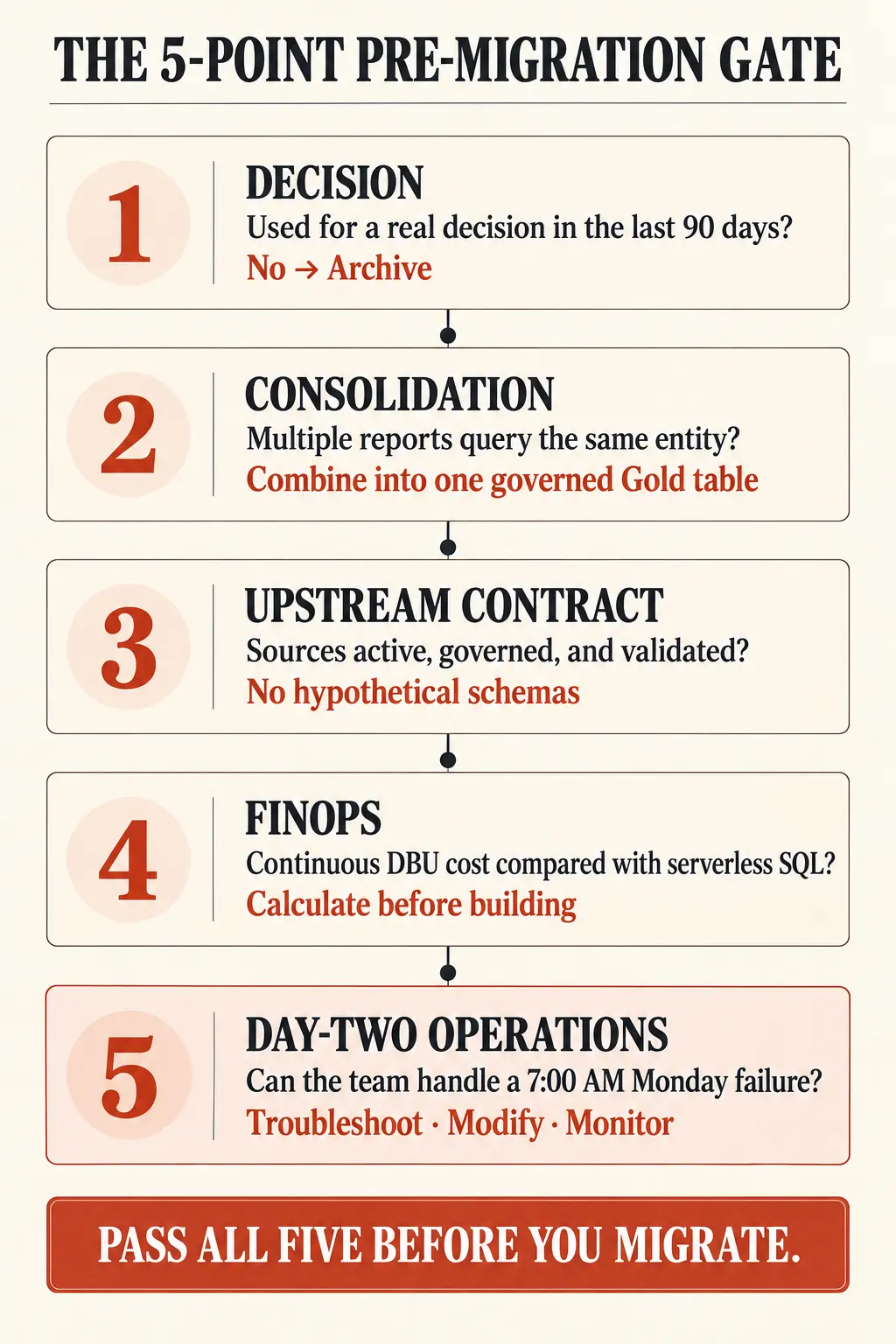
The Actionable Self-Audit: Five Questions Before You Commit
Before your organization signs a statement of work or begins rewriting legacy reports, run this five-point audit across your migration backlog:
The Decision Test: Can the business owner name a concrete operational decision made from this report in the last 90 days? If not, archive it.
The Consolidation Matrix: How many reports in your inventory query the exact same business entity? Consolidate filter variants into a single governed Gold table.
The Upstream Contract Gate: Are the required source tables active, governed, and validated in Unity Catalog? Never write downstream transformation code against hypothetical schemas.
The FinOps Sanity Check: Have you calculated the projected monthly DBU cost for running this workload continuously versus using shared serverless SQL compute?
The Day-Two Operational Test: Does the internal team responsible for daily operations know how to troubleshoot, modify, and monitor these pipelines when an error occurs at 7:00 AM on a Monday?
If an answer is missing, make resolving it part of the migration plan.
Migrate the Value, Not the Swamp
I have watched versions of this pattern repeat across platform shifts since 1999.
From dts to SSIS, from relational warehouses to Hadoop, and now into modern cloud platforms, teams keep discovering that converting code is easier to count than resolving architectural debt.
A successful migration preserves the business rules that matter. It retires work that has lost its purpose, consolidates logic that should be shared, and leaves the internal team able to operate what was built.
Count those outcomes alongside the reports migrated.
Five hundred rewritten notebooks can look impressive in a status meeting. A smaller, governed reporting estate that the business trusts and the team can maintain is a better result.
Strategy over syntax. Every single time.
Make the data decision you can defend six months from now.
Facing a legacy migration or rising cloud platform costs? Book an Architecture Advisory & Migration Strategy call to assess the backlog, dependencies, and operating model before committing to the rewrite.
For engineers and technical leads developing these skills, explore the Gambill Data Coaching Program.
Related decision support
Databricks lakehouse risk review
Get an independent view of migration scope, workload design, and cost before the platform commitment.
Review the service